Scan To Pay Parking: How QR Code Signs Are Helping Homeowners Compete With Parking Lots
If you own a driveway, a private parking space, or a small lot in a busy area, you have probably wondered whether you could rent it out for extra income. The obstacle has always been the same: how do you collect payment without standing there with a cash box or trading awkward Venmo requests with strangers? Commercial parking lots and decks never had this problem. They invested in pay stations, ticket machines, and mobile apps that made paying feel automatic and trustworthy. Now the CurbFlip.com, scan to pay parking signs are changing that equation. The same QR code technology used by major parking operators across the country is available to individual homeowners, and it is reshaping who can compete in the parking market.
Table of Contents
- Why Traditional Parking Lots and Decks Have Had the Advantage
- What Is Scan To Pay Parking and How Does It Work?
- How Homeowners Can Use Scan To Pay Parking Signs
- The Competitive Advantages Scan To Pay Gives Homeowners
- Addressing Common Concerns and Limitations
- The Future of Homeowner Parking: 2026 and Beyond
- Conclusion and Next Steps
Why Traditional Parking Lots and Decks Have Had the Advantage
Parking customers have been trained by decades of experience to expect a certain kind of transaction. They pull into a lot, grab a ticket from a machine, and pay at a kiosk or gate on the way out. The process feels official. There is signage, lighting, a brand name, and a receipt. All of that signals legitimacy, and legitimacy is what makes a driver comfortable leaving their car and their payment information with a stranger.

Commercial lots also benefit from visibility. A professionally printed sign with clear rates and a recognizable logo catches the eye of someone circling the block looking for a spot. Compare that to a handwritten “Parking $10” sign taped to a garage door. No matter how convenient the space, that sign does not inspire confidence. CurbFlip offers a happy medium with a recognizable logo and scannable signs that inspire confidence and professionalism. Drivers don’t worry about getting towed, overcharged, or scammed.
The payment gap has been the hardest part for homeowners to overcome. Cash requires the owner to be physically present for every transaction. Payment apps like Venmo or Zelle work, but they introduce friction: the driver has to open the app, search for the right username, type an amount, and wait for confirmation. If the owner is not standing right there, the driver might skip the payment entirely. Commercial lots solved this problem long ago with hardware that homeowners could never justify buying. Until now.
What Is Scan To Pay Parking and How Does It Work?
Scan to pay parking is a payment method that uses a QR code printed on a sign or sticker at a parking space. A driver pulls in, opens their phone’s camera app, points it at the code, and taps the link that appears on screen. That link opens a mobile payment page where the driver enters their license plate number, selects how long they want to park, and submits payment. The entire transaction can be completed in under 30 seconds, according to companies like CurbFlip.
The standard process follows five steps, the same steps. First, open the phone’s native camera app. There is no need to download a separate QR scanner or parking application. Second, center the QR code on the screen so the phone can read it clearly. Third, tap the notification or link that appears, which opens the payment page in the phone’s browser. Fourth, enter the license plate number and select the parking duration from the available options. Fifth, submit payment and keep the confirmation screen visible, either as a screenshot or an open browser tab.
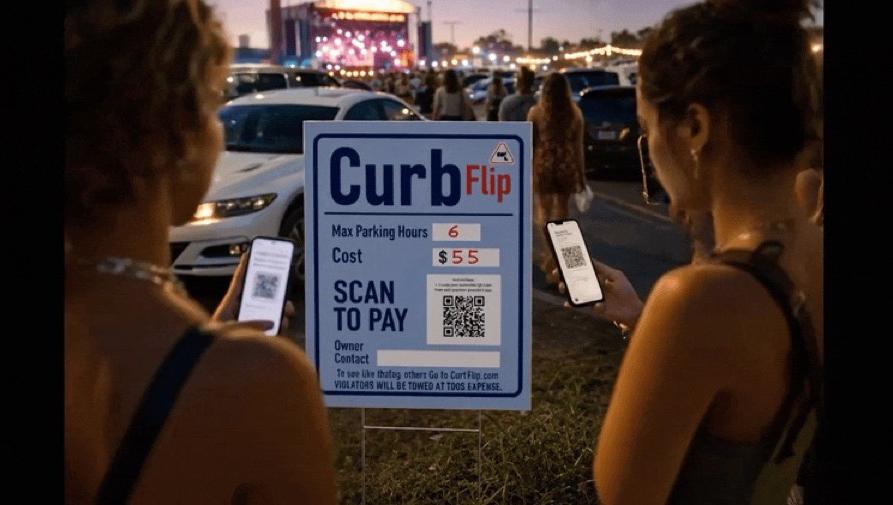
What makes this model particularly powerful for homeowners is that it requires no app download. Unlike parking apps that demand account creation, email verification, and stored payment methods, scan to pay works entirely through a web browser. A tourist visiting from out of state, a concertgoer who will never park in your neighborhood again, or an older driver who avoids downloading new apps can all complete the transaction without friction.
The system is contactless by design. No cash changes hands, no card is swiped through a reader, and no interaction with the property owner is required. That aligns with payment preferences that have become standard since the pandemic and reduces liability exposure for the homeowner. It also differs fundamentally from parking apps in one important way: scan to pay is session-based and location-specific. It is tied to a physical sign at a physical space. Parking apps are network-based and require an ongoing relationship with the user. The QR code model is simpler, more immediate, and asks nothing of the customer beyond a single transaction.
How Homeowners Can Use Scan To Pay Parking Signs
Setting Up Your Own QR Code Payment System
Getting started with scan to pay parking requires three things: a payment platform, a QR code, and a sign. In addition to their low fee online app, CurbFlip now offer QR code payment solutions designed specifically for small operators and individual property owners. When evaluating platforms, look for those that emphasize app-free technology, meaning customers pay through their browser without downloading anything. This is the feature that removes the biggest barrier to adoption.
The QR code itself must be unique to your parking space. Every payment is automatically attributed to the correct property and the correct time period. This is what creates the audit trail that protects both you and the customer.
Once you have the code, print it on a weatherproof sign. The sign should include more than just the QR code. It needs clear, simple instructions: “Scan to pay,” followed by the three or four steps a driver needs to complete. It should also display your hourly or daily rate, any maximum stay limits, and any rules that apply, such as “no oversized vehicles” or “do not block the sidewalk.” The sign is your storefront. CurbFlip’s clean, professionally printed sign on durable material signals that this is a real parking operation, not a casual arrangement between friends.
Set your rates and duration limits directly on the sign in the designated spaces. Like commercial lots with complex dynamic pricing models, most homeowners can change pricing manually should they desire, or keep straightforward flat rates. The platform should let you define how long a customer can stay.
Pricing and Positioning Against Commercial Lots
Homeowners have a structural cost advantage over parking decks and commercial lots. A parking deck carries enormous overhead: electricity for lighting and elevators, security staff, maintenance, insurance, and often debt service on the construction itself. A driveway or private space has none of those costs. That means you can charge significantly less than the commercial lot down the street and still keep all of the revenue as profit.
Price is not the only lever. A private driveway is often physically closer to the destination than a parking deck. If your space is two blocks from a stadium and the nearest garage is six blocks away, you are offering both a lower price and a shorter walk. Make that clear in any online listing and consider including it on the sign itself if the destination is obvious.
There is also an opportunity to offer monthly or recurring rates. This demonstrates that there is demand for subscription-style parking. If your space is near an airport, a business district, or a university, commuters and frequent travelers will pay for a guaranteed spot on a recurring basis. The same QR code payment flow handles the transaction, and the platform manages the recurring billing.
The Competitive Advantages Scan To Pay Gives Homeowners
The most immediate advantage is professionalism without overhead. A clean QR code sign, properly installed and clearly worded, instantly elevates a driveway or private space to the level of a commercial operation. It tells the driver that payment is tracked, recorded, and verifiable. That perception alone closes the trust gap that has historically kept drivers away from private parking options.
Speed matters in parking decisions. A driver circling the block is making a split-second choice about where to park. If they see a CurbFlip directional sign that says they can pay with their phone in under 30 seconds, that is faster than hunting for cash, waiting for a credit card terminal to process, or navigating an unfamiliar parking app. The faster and easier the payment, the more likely the driver is to commit to the space.
Digital payment records create an automatic audit trail. If a customer claims they paid but you never received the funds, you have timestamped transaction data from the platform. If a customer disputes a charge with their credit card company, you have a record of the license plate, the duration, and the payment confirmation. This protects you in ways that cash transactions never could.
The system also removes the requirement for your physical presence. You do not need to be home to collect payment. You do not need to coordinate arrival times or stand in the driveway waiting for a stranger to show up. The QR code handles the transaction, the funds are deposited into your account, and you can manage multiple spaces across different properties from a single dashboard.
Even at a small scale, payment data reveals useful patterns. You can see which days and hours are busiest, how long the average customer stays, and whether demand spikes during certain events or seasons. That information lets you adjust pricing intelligently. Charge more during peak demand, offer discounts during slow periods, and make decisions based on real data rather than guesswork. This was impossible when payments were cash in an envelope.
Addressing Common Concerns and Limitations
What If a Customer Doesn’t Have a Smartphone?
Smartphone penetration in the United States is high, but it is not universal. Some older drivers carry basic flip phones. Some tourists arrive without a domestic data plan. Some people simply run out of battery. You will encounter customers who cannot scan a QR code, and you need a fallback plan.
The simplest solution is to post contact information on the sign alongside the QR code. A customer who cannot scan can call or text to arrange payment. Some platforms offer SMS-based payment options that work on any phone with text messaging capability. Cash payments or leaving a cash box unattended is highly discouraged for safety reasons.
Security and Fraud Prevention
QR code fraud is a real concern. A bad actor can print a sticker with their own QR code and place it over yours, redirecting payments to their account. This is not a theoretical risk; it has happened with QR payment systems in other contexts. Homeowners should inspect their signs regularly, ideally every day or before any known high-demand event. Use tamper-evident stickers or protective clear covers that make it obvious if someone has tried to place something over the code.
Choose a reputable payment processor. Work with established platforms that use encrypted, PCI-compliant payment processing. Avoid creating a QR code that links directly to a personal Venmo, CashApp, or PayPal page. Those services offer little to no fraud protection for either party, and they do not provide the transaction records or dispute resolution tools that a dedicated parking payment platform offers.
The Future of Homeowner Parking: 2026 and Beyond
CurbFlip scannable signs and QR code payments are rapidly becoming the default method for parking transactions. With scan to pay already available in major cities across the country and adoption accelerating among both municipal and commercial operators, customer familiarity is growing fast. By the end of 2026, the expectation to “just scan and pay” will be near-universal among drivers under 50 and increasingly common among all age groups.
The next wave of integration is already visible. Online payment platforms like CurbFlip.com are beginning to connect with smart home and property technology. Imagine a payment confirmation that automatically opens a gate, triggers a license plate recognition camera, or adjusts pricing in real time based on local event schedules and demand spikes. These tools are moving from commercial facilities into the consumer market.
Scan to pay parking is also the natural payment layer for the peer-to-peer parking economy. Homeowners listing spaces on platforms like CurbFlip can use the same QR code system to handle transactions, creating a seamless experience from listing discovery to payment completion. The driver finds the space online, drives to it, scans the code, and pays, all without any direct coordination with the owner.
Cities are increasingly supportive of this model. Underutilized driveways and private spaces represent parking capacity that reduces street congestion without requiring new construction. Scan to pay provides the transparent, trackable payment method that makes private parking rentals acceptable to regulators and attractive to drivers.
Conclusion and Next Steps
Scan to pay parking signs have taken the payment infrastructure that once belonged exclusively to parking lots and decks and made it available to individual property owners. The technology is affordable, the setup is straightforward, and the competitive advantage is real. A homeowner with a well-located driveway and a professional QR code sign can now offer the same fast, trustworthy payment experience as a commercial garage, often at a lower price and a more convenient location.
If you have a space that sits empty during events, business hours, or peak tourist seasons, the tools to monetize it are ready. Research a QR code payment platform designed for small operators, order a weatherproof sign, and list your space on CurbFlip. The parking industry spent decades building the payment systems that made them dominant. Those same systems are now in your hands.