CurbFlip Airport Parking: How to Skip the $40-a-Day Airport Lot

You know the feeling. Your flight leaves at 6 AM, you are already cutting it close, and the economy lot is a half-mile from the terminal with a shuttle that runs “every 15 minutes” but never seems to arrive. Meanwhile, the daily rate keeps climbing: $30, $40, sometimes $50 a day if you are stuck in the garage. By the time you get back from a weeklong trip, parking has cost more than your plane ticket. There has to be a better way, and there is. CurbFlip airport parking connects drivers with homeowners and property owners who rent out their driveways, garages, and private lots near major airports. You get a guaranteed spot, upfront pricing, and rates that make the official lots look like highway robbery. Think of it as the Airbnb of parking, except instead of a vacation rental, you are booking a safe, affordable place to leave your car while you travel.

Table of Contents

What Is CurbFlip Airport Parking?

CurbFlip is a peer-to-peer parking marketplace. Property owners near airports list their unused spaces, driveways, garages, private lots, even a covered spot next to someone’s house, and drivers book those spaces by the day, week, or month. The platform handles the payment, the booking confirmation, and the communication, so there is no awkward handshake or cash exchange in a parking lot at 5 AM.

The range of options is wider than you might expect. One listing might be a homeowner’s garage near Hartsfield-Jackson in Atlanta, where the host works from home and keeps an eye on your car. Another might be a dedicated lot with EV charging, security cameras, and a shuttle to the terminal. Some hosts offer covered parking for travelers worried about hail or summer sun. Others include extras like Wi-Fi, car wash access, or an Uber pickup credit. You pick the spot that fits your budget and your needs.

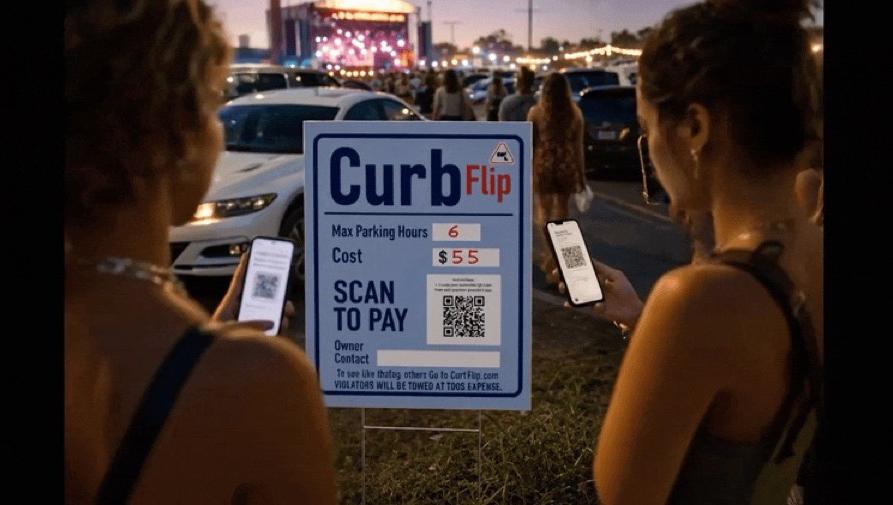
One feature that sets CurbFlip apart is the “Scan To Pay” parking sign. Hosts can place a physical sign with a QR code at their parking space. If you are driving toward the airport without a reservation and spot a CurbFlip sign, you can scan the code, pay on the spot, and park immediately. No app download required in that moment, no account setup, just a quick scan and you are done. It is the fastest last-minute parking solution you will find.

The platform covers major US cities and their airports: New York, Los Angeles, Atlanta, San Francisco, Chicago, Seattle, and more. If you are flying out of a hub city, there is a good chance someone nearby is renting a spot.

How CurbFlip Compares to the “Airbnb of Parking” Reputation

CurbFlip has described itself as the Airbnb of parking spaces since it launched in 2015, and the comparison is fair. Hosts set their own prices, availability, and rental terms. They decide whether to offer hourly, daily, weekly, or monthly rates. They choose what amenities to include and how to describe their space. For drivers, that means the market sets the price, not a parking monopoly that knows you have nowhere else to go.

There is one key difference from Airbnb that works in a driver’s favor: most CurbFlip listings do not carry the same minimum-stay pressure. While some airport listings require a 7-day minimum for long-term rates, many spaces are available by the day or even by the hour. You are not locked into a rigid structure. You book what you need, when you need it, and you pay a rate that reflects a real person’s driveway, not a corporate parking garage’s overhead.

How to Book CurbFlip Airport Parking in 4 Simple Steps

Booking a spot takes less than five minutes once you know what to look for. Here is the process from start to finish.

Step one: head to CurbFlip and search for your airport city. You can browse by city directly from the homepage, or use the search bar to narrow things down. If you are flying out of Atlanta, search Atlanta. If you are leaving from Sea-Tac, search Seattle. The platform shows you every available listing in that area.

Step two: filter by your travel dates and the duration you need. This is where you can also narrow by amenities. Need covered parking? Filter for it. Want a spot with EV charging? Check that box. Some hosts offer airport shuttle service or rideshare coordination, so look for those tags if you want a seamless trip to the terminal.

Step three: read the listing details carefully. Look at the photos, check the host’s description, and note any access instructions. Some hosts include helpful details like “I work from home so your car is safe with me” or “3-minute walk to the terminal.” These are real people offering real spaces, and the description often tells you exactly what to expect.

Step four: book and pay securely online. CurbFlip processes the payment, and you receive a confirmation with access details instantly. No cash, no checks, no wondering if your spot is actually reserved. If you are already near the airport and spot a CurbFlip “Scan To Pay” sign, you can skip the online search entirely and book on the spot by scanning the QR code.

What to Look for in a CurbFlip Airport Parking Listing

Not every listing is the same, and a little attention upfront saves headaches later. First, check the distance to the terminal. Some spots are genuinely walkable. Others require a short rideshare or a shuttle, and the host usually notes that in the description.

Look for amenities that matter to you. Covered parking protects your car from weather. Security cameras and vehicle monitoring add peace of mind. EV charging is a bonus if you drive electric and want to return to a full battery. Some hosts even offer airport shuttle service or coordinate an Uber pickup, which can save you the cost and hassle of arranging your own ride.

Read the host’s description thoroughly. The best listings include details about the neighborhood, access instructions, and any quirks of the space. A host who writes “I work from home so your car is safe with me” is telling you something valuable: someone is around, and the spot is monitored.

Finally, confirm the minimum booking duration. Some airport listings require a 7-day minimum to unlock the lowest daily rate. If you are only traveling for a long weekend, you may need a different listing or a slightly higher daily rate. Plan accordingly.

CurbFlip Airport Parking Rates vs. Official Airport Lots

The question every driver asks first: what does this actually cost? The answer is almost always “less than the airport lot,” often by a wide margin.

Take a real example. A CurbFlip listing near Hartsfield-Jackson Atlanta International Airport charges $11.50 per day for long-term airport parking, with a 7-day minimum booking. That comes to $80.50 for a full week. Now compare that to official airport parking at a major US hub. Economy lots at airports like JFK, LAX, O’Hare, and Sea-Tac routinely charge $25 to $50 per day. A week in an official lot can run anywhere from $175 to $350, and that is for the cheap section. Garage parking near the terminal often hits $40 to $60 a day, pushing a week’s total past $400.

The savings get even starker for monthly parking. CurbFlip supports 30-day minimum bookings at discounted daily rates. A month in a homeowner’s driveway or garage near the airport might cost a few hundred dollars. The same month in an official airport lot? You could be looking at a bill that rivals your rent. For extended trips, military deployments, or snowbirds heading south for the winter, the peer-to-peer option is not just cheaper, it is the only sensible choice.

Rates vary by city and property, of course. A spot near LAX might cost more than one near Atlanta. But the pattern holds across every city CurbFlip serves: peer-to-peer spots consistently undercut official airport lots, often by 50% or more.

How Much Does It Cost to Leave Your Car at the Airport for a Week?

Official airport lots at major US hubs typically charge between $150 and $350 for a week of parking, depending on the airport and whether you choose economy, garage, or valet. At some airports, the economy lot alone runs $25 a day, and that is before taxes and fees.

On CurbFlip, a week of airport parking near Atlanta runs about $80.50 based on the featured listing, and similar deals exist in other cities. The key is booking in advance and choosing a listing that offers weekly discounted rates. When a host sets a 7-day minimum, they usually drop the daily rate significantly, and that is where the real savings kick in.

Can You Park at the Airport for a Month?

Yes, and this is where CurbFlip airport parking really shines. The platform supports monthly rentals with a 30-day minimum, and hosts often offer steeply discounted daily rates for long-term stays. Official airport lots rarely offer true monthly rates, and when they do, the price is still high enough to make you wince.

A residential driveway or garage near the airport is often the smarter play for extended trips. Whether you are deploying, taking a long overseas assignment, or just escaping winter for a month, a peer-to-peer spot gives you a safe place to leave your car without draining your bank account. The host knows you will be gone a while, the rate reflects that, and you come back to a car that has been sitting in a quiet neighborhood instead of a sprawling, floodlit lot.

Is CurbFlip Airport Parking Safe and Reliable?

If you have never used a peer-to-peer parking platform, the trust question is probably top of mind. You are leaving your car with a stranger. How do you know the spot is real? How do you know your car will be there when you get back?

The booking and payment process is handled securely through CurbFlip. You pay online, you receive a confirmation, and there is a record of the transaction. No cash changes hands in a dark lot. No handshake deal you have to hope the other person remembers.

Many hosts add security features to their listings. Security cameras, vehicle monitoring, and even Wi-Fi are common value-added services. A host who works from home and lists that fact in their description is essentially offering built-in surveillance. Your car is not sitting in an anonymous row of thousands; it is parked in someone’s driveway or garage, often within sight of their front door.

CurbFlip has been operating since 2015, and the platform’s structure creates accountability on both sides. Hosts set their terms, drivers book upfront, and the platform sits in the middle. The review system, while still growing, gives you a way to check a host’s track record before you book. Look for listings with detailed photos and thorough descriptions. Communicate through the platform if you have questions. These small steps go a long way toward a smooth experience.

Tips for a Smooth CurbFlip Airport Parking Experience

A little preparation makes the difference between a stress-free trip and a frantic morning. Book your spot in advance, especially if you have an early flight. The best listings near major airports get snapped up, and you do not want to be searching for parking at 10 PM the night before you leave.

Screenshot your confirmation and access instructions before you head to the airport. Cell service can be spotty in parking garages and unfamiliar neighborhoods, and you do not want to be locked out of the details when you need them most.

If the listing mentions shuttle service or Uber coordination, reach out to the host before your departure day. Confirm the pickup point, the timing, and any instructions. A quick message can save you a long walk or a missed connection.

For long-term parking, let the host know your return date so they can hold the spot and expect your arrival. Most hosts appreciate the heads-up, and it ensures your space is ready when you get back.

If you are driving to the airport without a booking, keep an eye out for CurbFlip “Scan To Pay” signs near the terminal. They are the fastest last-minute solution, and they turn a stressful search into a 30-second transaction.

The Host Side: Why These Airport Parking Spots Exist

Understanding who lists these spaces helps explain why the model works so well. Most hosts are homeowners who live near an airport and have a driveway, garage, or extra lot space that sits empty during the day or while they travel. They list the space on CurbFlip to earn extra income, and they set rates that make sense for their neighborhood.

Many of these hosts are frequent flyers themselves. They know the pain of airport parking firsthand: the circling, the overpriced garages, the shuttle that never shows. They want to offer a better deal, and they often add thoughtful touches because they have been on the other side of the equation. When a host writes “I work from home so your car is safe with me,” they are not just filling space in a description. They are telling you they understand what matters: security, reliability, and a little human accountability.

These are real people offering a genuine local alternative. They are not a faceless parking corporation. They are your neighbors, or at least someone’s neighbors, and they have a spot you can use for less than the airport charges.

Frequently Asked Questions About CurbFlip Airport Parking

Is there a parking fee at the airport? Yes, and it adds up fast. Official airport lots charge daily rates that range from $15 for remote economy lots to $60 or more for terminal garages. CurbFlip offers an alternative with upfront, all-in pricing that typically runs well below those rates.

What is the best way to save on airport parking? Compare your options. Check the official airport lots, look at off-site parking companies, and then browse CurbFlip for peer-to-peer spots near your terminal. In most cities, the peer-to-peer option wins on price, and it often comes with added perks like covered parking or a personal point of contact.

Can I cancel or modify my CurbFlip booking? Cancellation policies are set by each host, not by the platform. Check the listing terms before you book so you know what flexibility you have. Some hosts offer free cancellation up to a certain date; others have stricter policies.

What happens if I arrive and the spot is not available? Contact the host through the platform immediately. CurbFlip’s structure holds hosts accountable for their listings, and the platform’s messaging system keeps a record of all communication. In the rare event something goes wrong, you have documentation and a clear path to resolution.

Ready to Ditch the Airport Parking Lot?

CurbFlip airport parking takes the stress, the cost, and the uncertainty out of leaving your car while you travel. You get a guaranteed spot at a rate that makes sense, booked online in minutes, with the kind of local convenience no parking garage can match. Whether you are flying out of New York, Los Angeles, Atlanta, San Francisco, Chicago, Seattle, or another major city, there is likely a driveway or garage nearby waiting for your car.

Check availability for your next trip. A weekend getaway, a weeklong vacation, a month on the road, whatever the duration, there is a spot that fits. As more hosts list their spaces, the network grows, and airport parking gets smarter. You can browse available parking spots by city right now and see what is available near your terminal. The days of circling a crowded lot at 5 AM are over.

Scan To Pay Parking: How QR Code Signs Are Helping Homeowners Compete With Parking Lots

If you own a driveway, a private parking space, or a small lot in a busy area, you have probably wondered whether you could rent it out for extra income. The obstacle has always been the same: how do you collect payment without standing there with a cash box or trading awkward Venmo requests with strangers? Commercial parking lots and decks never had this problem. They invested in pay stations, ticket machines, and mobile apps that made paying feel automatic and trustworthy. Now the CurbFlip.com, scan to pay parking signs are changing that equation. The same QR code technology used by major parking operators across the country is available to individual homeowners, and it is reshaping who can compete in the parking market.

Table of Contents

Why Traditional Parking Lots and Decks Have Had the Advantage

Parking customers have been trained by decades of experience to expect a certain kind of transaction. They pull into a lot, grab a ticket from a machine, and pay at a kiosk or gate on the way out. The process feels official. There is signage, lighting, a brand name, and a receipt. All of that signals legitimacy, and legitimacy is what makes a driver comfortable leaving their car and their payment information with a stranger.

Black and white aerial view capturing a suburban neighborhood in Bedfordshire, England with parked cars and residential rooftops.
Photo by Altaf Shah on Pexels

Commercial lots also benefit from visibility. A professionally printed sign with clear rates and a recognizable logo catches the eye of someone circling the block looking for a spot. Compare that to a handwritten “Parking $10” sign taped to a garage door. No matter how convenient the space, that sign does not inspire confidence. CurbFlip offers a happy medium with a recognizable logo and scannable signs that inspire confidence and professionalism. Drivers don’t worry about getting towed, overcharged, or scammed.

The payment gap has been the hardest part for homeowners to overcome. Cash requires the owner to be physically present for every transaction. Payment apps like Venmo or Zelle work, but they introduce friction: the driver has to open the app, search for the right username, type an amount, and wait for confirmation. If the owner is not standing right there, the driver might skip the payment entirely. Commercial lots solved this problem long ago with hardware that homeowners could never justify buying. Until now.

What Is Scan To Pay Parking and How Does It Work?

Scan to pay parking is a payment method that uses a QR code printed on a sign or sticker at a parking space. A driver pulls in, opens their phone’s camera app, points it at the code, and taps the link that appears on screen. That link opens a mobile payment page where the driver enters their license plate number, selects how long they want to park, and submits payment. The entire transaction can be completed in under 30 seconds, according to companies like CurbFlip.

The standard process follows five steps, the same steps. First, open the phone’s native camera app. There is no need to download a separate QR scanner or parking application. Second, center the QR code on the screen so the phone can read it clearly. Third, tap the notification or link that appears, which opens the payment page in the phone’s browser. Fourth, enter the license plate number and select the parking duration from the available options. Fifth, submit payment and keep the confirmation screen visible, either as a screenshot or an open browser tab.

What makes this model particularly powerful for homeowners is that it requires no app download. Unlike parking apps that demand account creation, email verification, and stored payment methods, scan to pay works entirely through a web browser. A tourist visiting from out of state, a concertgoer who will never park in your neighborhood again, or an older driver who avoids downloading new apps can all complete the transaction without friction.

The system is contactless by design. No cash changes hands, no card is swiped through a reader, and no interaction with the property owner is required. That aligns with payment preferences that have become standard since the pandemic and reduces liability exposure for the homeowner. It also differs fundamentally from parking apps in one important way: scan to pay is session-based and location-specific. It is tied to a physical sign at a physical space. Parking apps are network-based and require an ongoing relationship with the user. The QR code model is simpler, more immediate, and asks nothing of the customer beyond a single transaction.

How Homeowners Can Use Scan To Pay Parking Signs

Setting Up Your Own QR Code Payment System

Getting started with scan to pay parking requires three things: a payment platform, a QR code, and a sign. In addition to their low fee online app, CurbFlip now offer QR code payment solutions designed specifically for small operators and individual property owners. When evaluating platforms, look for those that emphasize app-free technology, meaning customers pay through their browser without downloading anything. This is the feature that removes the biggest barrier to adoption.

The QR code itself must be unique to your parking space. Every payment is automatically attributed to the correct property and the correct time period. This is what creates the audit trail that protects both you and the customer.

Once you have the code, print it on a weatherproof sign. The sign should include more than just the QR code. It needs clear, simple instructions: “Scan to pay,” followed by the three or four steps a driver needs to complete. It should also display your hourly or daily rate, any maximum stay limits, and any rules that apply, such as “no oversized vehicles” or “do not block the sidewalk.” The sign is your storefront. CurbFlip’s clean, professionally printed sign on durable material signals that this is a real parking operation, not a casual arrangement between friends.

Set your rates and duration limits directly on the sign in the designated spaces. Like commercial lots with complex dynamic pricing models, most homeowners can change pricing manually should they desire, or keep straightforward flat rates. The platform should let you define how long a customer can stay.

Pricing and Positioning Against Commercial Lots

Homeowners have a structural cost advantage over parking decks and commercial lots. A parking deck carries enormous overhead: electricity for lighting and elevators, security staff, maintenance, insurance, and often debt service on the construction itself. A driveway or private space has none of those costs. That means you can charge significantly less than the commercial lot down the street and still keep all of the revenue as profit.

Price is not the only lever. A private driveway is often physically closer to the destination than a parking deck. If your space is two blocks from a stadium and the nearest garage is six blocks away, you are offering both a lower price and a shorter walk. Make that clear in any online listing and consider including it on the sign itself if the destination is obvious.

There is also an opportunity to offer monthly or recurring rates. This demonstrates that there is demand for subscription-style parking. If your space is near an airport, a business district, or a university, commuters and frequent travelers will pay for a guaranteed spot on a recurring basis. The same QR code payment flow handles the transaction, and the platform manages the recurring billing.

The Competitive Advantages Scan To Pay Gives Homeowners

The most immediate advantage is professionalism without overhead. A clean QR code sign, properly installed and clearly worded, instantly elevates a driveway or private space to the level of a commercial operation. It tells the driver that payment is tracked, recorded, and verifiable. That perception alone closes the trust gap that has historically kept drivers away from private parking options.

Speed matters in parking decisions. A driver circling the block is making a split-second choice about where to park. If they see a CurbFlip directional sign that says they can pay with their phone in under 30 seconds, that is faster than hunting for cash, waiting for a credit card terminal to process, or navigating an unfamiliar parking app. The faster and easier the payment, the more likely the driver is to commit to the space.

Digital payment records create an automatic audit trail. If a customer claims they paid but you never received the funds, you have timestamped transaction data from the platform. If a customer disputes a charge with their credit card company, you have a record of the license plate, the duration, and the payment confirmation. This protects you in ways that cash transactions never could.

The system also removes the requirement for your physical presence. You do not need to be home to collect payment. You do not need to coordinate arrival times or stand in the driveway waiting for a stranger to show up. The QR code handles the transaction, the funds are deposited into your account, and you can manage multiple spaces across different properties from a single dashboard.

Even at a small scale, payment data reveals useful patterns. You can see which days and hours are busiest, how long the average customer stays, and whether demand spikes during certain events or seasons. That information lets you adjust pricing intelligently. Charge more during peak demand, offer discounts during slow periods, and make decisions based on real data rather than guesswork. This was impossible when payments were cash in an envelope.

Addressing Common Concerns and Limitations

What If a Customer Doesn’t Have a Smartphone?

Smartphone penetration in the United States is high, but it is not universal. Some older drivers carry basic flip phones. Some tourists arrive without a domestic data plan. Some people simply run out of battery. You will encounter customers who cannot scan a QR code, and you need a fallback plan.

The simplest solution is to post contact information on the sign alongside the QR code. A customer who cannot scan can call or text to arrange payment. Some platforms offer SMS-based payment options that work on any phone with text messaging capability. Cash payments or leaving a cash box unattended is highly discouraged for safety reasons.

Security and Fraud Prevention

QR code fraud is a real concern. A bad actor can print a sticker with their own QR code and place it over yours, redirecting payments to their account. This is not a theoretical risk; it has happened with QR payment systems in other contexts. Homeowners should inspect their signs regularly, ideally every day or before any known high-demand event. Use tamper-evident stickers or protective clear covers that make it obvious if someone has tried to place something over the code.

Choose a reputable payment processor. Work with established platforms that use encrypted, PCI-compliant payment processing. Avoid creating a QR code that links directly to a personal Venmo, CashApp, or PayPal page. Those services offer little to no fraud protection for either party, and they do not provide the transaction records or dispute resolution tools that a dedicated parking payment platform offers.

The Future of Homeowner Parking: 2026 and Beyond

CurbFlip scannable signs and QR code payments are rapidly becoming the default method for parking transactions. With scan to pay already available in major cities across the country and adoption accelerating among both municipal and commercial operators, customer familiarity is growing fast. By the end of 2026, the expectation to “just scan and pay” will be near-universal among drivers under 50 and increasingly common among all age groups.

The next wave of integration is already visible. Online payment platforms like CurbFlip.com are beginning to connect with smart home and property technology. Imagine a payment confirmation that automatically opens a gate, triggers a license plate recognition camera, or adjusts pricing in real time based on local event schedules and demand spikes. These tools are moving from commercial facilities into the consumer market.

Scan to pay parking is also the natural payment layer for the peer-to-peer parking economy. Homeowners listing spaces on platforms like CurbFlip can use the same QR code system to handle transactions, creating a seamless experience from listing discovery to payment completion. The driver finds the space online, drives to it, scans the code, and pays, all without any direct coordination with the owner.

Cities are increasingly supportive of this model. Underutilized driveways and private spaces represent parking capacity that reduces street congestion without requiring new construction. Scan to pay provides the transparent, trackable payment method that makes private parking rentals acceptable to regulators and attractive to drivers.

Conclusion and Next Steps

Scan to pay parking signs have taken the payment infrastructure that once belonged exclusively to parking lots and decks and made it available to individual property owners. The technology is affordable, the setup is straightforward, and the competitive advantage is real. A homeowner with a well-located driveway and a professional QR code sign can now offer the same fast, trustworthy payment experience as a commercial garage, often at a lower price and a more convenient location.

If you have a space that sits empty during events, business hours, or peak tourist seasons, the tools to monetize it are ready. Research a QR code payment platform designed for small operators, order a weatherproof sign, and list your space on CurbFlip. The parking industry spent decades building the payment systems that made them dominant. Those same systems are now in your hands.

How To List Your Parking on CurbFlip

The highest-performing CurbFlip listings tend to be the ones that answer three questions for a driver immediately:

  1. Can I park here?
  2. How much does it cost?
  3. How do I pay?

Here’s the approach I’d recommend for CurbFlip hosts.

1. Pick locations with built-in demand

Your parking space will perform best if it’s within a short walk of:

  • Stadiums
  • Concert venues
  • Beaches
  • Airports
  • Downtown business districts
  • Colleges
  • Hospitals
  • Tourist attractions
  • Transit stations
  • Convention centers

2. Create a detailed listing

Include:

  • 5–10 high-quality photos
  • Exact walking time to nearby attractions
  • Vehicle size limits
  • Whether the space is covered
  • Security features (camera, lighting, gated access)
  • Easy arrival instructions
  • Clear check-in/check-out times

Listings with more information generally inspire more confidence.

3. Price strategically

Rather than using one price all year:

  • Normal weekdays
  • Weekend rate
  • Event pricing
  • Holiday pricing
  • Weekly discount
  • Monthly discount

For major concerts or football games, don’t be afraid to charge significantly more if demand supports it.

4. Offer multiple rental lengths

CurbFlip supports:

  • Hourly (if appropriate)
  • Daily
  • Weekly
  • Monthly

Offering all three increases your chances of appearing in more searches.

5. Add valuable amenities

Even simple extras can justify a higher price:

  • EV charging
  • Covered parking
  • Security cameras
  • Well-lit parking
  • Wi-Fi
  • Car wash access
  • Airport shuttle or rides
  • Vehicle monitoring

6. Use a physical “Scan To Pay” sign

One of CurbFlip’s biggest advantages is combining online listings with on-site signage.

Drivers who discover your parking space while driving can simply:

  • Scan the QR code
  • Pay immediately
  • Park

This captures customers who never searched online beforehand.

7. Write an SEO-friendly title

Instead of:

Parking Space

Use something like:

Parking for Braves Games – 3-Minute Walk to Stadium

or

Airport Parking – Secure Driveway – Free EV Charging

Include landmarks people actually search for.

8. Turn on availability well in advance

Many drivers book days or weeks before:

  • Football games
  • Festivals
  • Concerts
  • Beach vacations
  • Airport trips

Having your calendar open early helps capture those bookings.

9. Collect reviews

After each rental, encourage satisfied drivers to leave a review. Positive reviews improve trust and can increase future bookings.

10. Promote beyond the marketplace

Share your listing on:

  • Facebook neighborhood groups
  • Local Reddit communities (where appropriate)
  • Instagram
  • X
  • Community event pages

You can also use location-specific hashtags such as:#Parking #AtlantaParking #AirportParking #ConcertParking #GameDayParking

The highest-earning CurbFlip formula

If I wanted to maximize earnings on CurbFlip, I’d focus on this combination:

  • ✓ Free online listing
  • ✓ Professional photos
  • ✓ QR “Scan To Pay” sign on-site
  • ✓ Event-based pricing
  • ✓ Multiple booking durations (daily, weekly, monthly)
  • ✓ Security camera visible
  • ✓ Excellent reviews
  • ✓ Nearby landmark highlighted in the title
  • ✓ Social media promotion before major events

That approach combines online discovery with drive-by customers and helps maximize occupancy throughout the year.

A CurbFlip Love Letter To Its Users

My Dear Users,

We are almost done with our website upgrade. Take us for a spin! Log in to www.CurbFlip.com and let us know what you think. 

Every listing (including weekly and monthly) are calculated on a daily rate.

Example: A $300 per month listing should show $10 per day/ minimum 30 day booking.

We are now using stripe to accept payments because stripe provides a flawless user experience. You will need to connect your existing Stripe account, or create a new one, which takes only minutes. Instructions here:

https://www.curbflip.com/p/how_to_stripe

If you live near a stadium or beach, and want to rent your parking for a single game or “one day” event, We have physical signs for purchase available at our new CurbFlip Store. The signs are scannable, and have a simple QR code setup. The CurbFlip Store is here:

https://www.curbflip.com/p/the_curbflip_store

Also, we are investing heavily in advertisement to bring more drivers to your parking spaces. Check your emails for inquiries and be ready to process payments. These drivers will book and pay only where payments can be processed.

See our new ads here:

https://www.curbflip.com/p/press_media

We are very proud and passionate about what we are doing. We were one of the first to create a parking solution, and we keep an eye on the competition to stay the best provider for user experience. We have created a place to show CurbFlip vs Competitors:

https://www.curbflip.com/p/compare

Thank you for joining us on this journey and we remain committed to providing the best technologies and innovations to meet your income goals.

Love, CurbFlip

The New CurbFlip

Exciting Changes Have Come To CurbFlip!

Dear CurbFlip Customer,

We’re excited to announce that CurbFlip.com has undergone a major platform upgrade designed to improve your experience and provide powerful new opportunities for both Hosts and Drivers.

Our team has been working behind the scenes to migrate CurbFlip to a new backend infrastructure. This upgrade will enhance performance, improve our workflow, and allow us to introduce new features based on the valuable feedback we’ve received from our community.

Visit us at www.CurbFlip.com

What’s New

Faster, Simpler Registration

You’ll now be able to sign up based on how you use CurbFlip:

  • Driver Account – For users looking for parking.
  • Host Account – For users listing parking spaces.

This creates a more personalized experience right from the start.

Driver Improvements

Drivers will continue to enjoy quick registration, with just one additional step:

  • Enter your vehicle’s make and model during signup.
  • Browse and book available parking listings anywhere as always.

Host Improvements

Hosts will also benefit from a streamlined signup process, including:

  • A faster registration experience.
  • A new question related to the The CurbFlip Store, preparing your account for an exciting new earning opportunity.

New Payment Processing with Stripe

We’re transitioning from PayPal to Stripe as our payment processor.

This change provides Hosts with:

  • A smoother payment experience.
  • Faster and more transparent payouts.
  • An easy one-time setup to connect your Stripe account.

We’ll provide simple instructions to guide you through the transition.

Updated Booking Options

Our booking system is becoming even more flexible.

  • Daily rentals and the existing calendar functionality remain unchanged.
  • Weekly and Monthly rentals will now use specific start and end dates, just like daily bookings.
  • Listings will display a daily rate while automatically calculating the total for weekly or monthly reservations.

This allows one booking calendar to manage all reservation types more efficiently.

Introducing the CurbFlip Store

One of the biggest additions to CurbFlip is the launch of the CurbFlip Store.

Hosts will be able to purchase professional Scan-to-Pay parking signs designed for high-demand, real-time parking situations such as:

  • Festivals
  • Concerts
  • Sporting events
  • Beaches
  • Community events
  • Any “day-of” parking opportunity

These signs will include:

  • Directional arrow signs guiding drivers to available parking.
  • Parking space signs with a unique QR code.
  • Instant “Scan to Pay” capability that allows drivers to pay the Host immediately.

The best part? Drivers do not need the CurbFlip app to pay for parking. Anyone can simply scan the QR code and complete payment instantly.

This opens the door for Hosts to monetize event parking and other short-term opportunities far beyond traditional app users.

The redesigned CurbFlip website will also feature detailed instructional videos demonstrating how the CurbFlip Store works and how Hosts can maximize their earnings.

A New, Improved Website

Our refreshed website will include several new resources, including:

  • About Us
  • Why CurbFlip
  • CurbFlip vs. Competitors
  • Our Elevator Pitch
  • Press & Media page featuring our cool new CurbFlip advertising campaigns
  • Instructional videos and tutorials

What Isn’t Changing

While we’re adding exciting new capabilities, the things our customers already love remain the same:

  • Fast and simple signup
  • Easy login
  • User-friendly experience
  • Secure payments
  • Our signature 5% fee on every transaction

Thank You

Your feedback has played a major role in shaping this next chapter of CurbFlip. These improvements are designed to make parking easier for Drivers while creating even greater earning opportunities for Hosts.

We’re excited to share this new experience with you and look forward to growing together.

Thank you for being part of the CurbFlip community.

The CurbFlip Team

How CurbFlip Works

How it works

Drivers:            Search – Book – Save

Owners:           List – Book – Earn

Booking:  Payments are made online before you park.  Drivers and owners will receive an emailed (printable) confirmation.  No funds required while parking.
 

Parking Space Owners:  List – Book – Earn

To list, click “Add a Listing” or “Add Your Parking Space ” and answer a few quick questions about your parking space.  That’s it. We make it easy! We help make your listings look pretty with extra pictures, videos, and text.  We also market your listing to drivers who are always looking for parking spaces.

**VERY IMPORTANT TIP**  Add your PayPal information as soon as possible.  You don’t want to rush when a driver is ready and waiting to pay you right now.

The process is very simple:

You must have a free PayPal business account.

To upgrade to a PayPal business account from the basic account, go to www.paypal.com/upgrade. If you are an individual, just enter your own name when PayPal asks for a “business name”.

Here are a few additional listing tips:
1. Be thorough in your profile. Remember we do help.  List what’s nearby.  If you have a picture of your parking spot, add it.  We will add pictures and market your parking space to our driver communities. We will always help you.

2.  Please keep in mind that we offer the flexibility to book daily, weekly, or monthly.  This means you can have up to 3 free listings for one parking spot!

3. Share! – Our goal is to connect the best drivers with your parking space so help us spread the word and build our community! When you post on social media in your parking space, use #Parking, #CurbFlip #ParkingSpace and we will reshare and offer occasional discounts to those that help spread the word.

Your listings are free but when it books, we charge a service fee (16%+ paypal fee) to help keep the lights on at CurbFlip.  * Important * If your parking space does not book, you never pay us anything.  If you have any questions regarding pricing, getting started, or at any time need any help please reach out to us at support@CurbFlip.com.

Drivers:  Search – Book – Save
Booking a parking space has never been easier! It’s easy to get started (FREE).  You don’t need to sign up to view listings, but as soon as you create a profile you can book, and pay for great parking.

Here are a few tips:
1. Be thorough in your profile. The parking space owners that we work with are very selective and want to know who will be in their parking space.

2. Keep in mind that we book daily, weekly, and monthly parking spaces. If you have any special requests, questions regarding extra services like wifi, battery charging, transportation, or anything else, you can contact parking space owners directly from their listing.  Please keep in mind we make the process easier for parking spaces owners so they prefer to book through our platform.

3. Share! – Our goal is to connect drivers with the best parking spaces so help us spread the word and build our community! When you post on social media in the parking space, use #Parking, #CurbFlip #ParkingSpace and we will reshare and offer occasional discounts to those that help spread the word.

CurbFlip is the easiest way for drivers to book flexible parking space time.

When driving to sporting events, concerts, work, the airport, or if you need to charge your car battery, the CurbFlip community is the answer.

Find the best parking spaces, schedule time (1 day, 1 week, or 1 month blocks) and seamlessly pay with a few clicks. We take care of the rest so you can make the best use of your time!

CurbFlip Q and A
WHAT IF THERE AREN’T ANY PARKING SPACES LISTED IN MY AREA?
Start the trend!  By being the first to list in your area, all of the attention from those living in, or traveling to your area is directed at you and only you.

HOW MUCH SHOULD I CHARGE TO RENT OUT MY PARKING SPACES?
Whatever makes it worthwhile for you.  Maybe you don’t want to list that great parking space in the perfect prime location for an arm and a leg, but you can make serious income by renting it consistently over and over.  Your parking space is just laying there on the ground, waiting to go to work for you.  In the end, the price should simply be whatever amount makes it worthwhile for you.

WHO CAN JOIN?
Anyone can join!  But not everyone can stay necessarily.  We will continually pour over reviews, transactions and listings in order to maintain our legitimacy and trust within the community.  We think CurbFlip can be a great thing for the whole community, but we need your help to make sure that the right folks are involved.

Meet and connect with others from the community.  Find great parking spots.  Share your unused parking space.

Instagram: @CurbFlip      FacebookCurbFlip     Twitter: @CurbFlip     Tumblr: CurbFlip.tumblr.com

Why CurbFlip?

The AirBnB of Parking Space Rentals

CurbFlip is the easiest way for you to rent out your extra parking space or driveway.

We help drivers everywhere find great parking close to jobs, concert venues, sports venues, airports, beaches, and events.

Traditional parking can be expensive even if you find a parking deck with unused space.  Parking for employment can be super expensive.  While you read this, 50 million drivers are looking for better parking deals.

Make money by renting out your extra parking space. Your listing is free!  (And we help make it look pretty)

CurbFlip – A Parking Space Marketplace

The CurbFlip Guide To Safely Renting Out Your Driveway
When renting out your driveway, the following rules should always apply:
You want a simple sign up process
You want to be able to sign up quickly with an email address or through a social network like Facebook.  You should be able to sign in even if you are not ready to rent out your parking space.  Sign up for top-rated apps should take less than one minute.  CurbFlip allows for a quick sign up, and unlike EVERY other parking app, you don’t have to sign up just to see the spaces available in your area.
You want to be able to add terms
CurbFlip comes with basic rental terms that protect you and your space.  But let’s face it, all parking spaces were not created equal.  CurbFlip gives you the option of adding additional terms to your rental agreement that will suit your specific parking situation.  Additional terms can include instructions for beach access, noise levels, where, when, or how to park.
Privacy is very important
You and each driver will be required to give personal information.  Your web browser should transfer this data to an app equipped with SSL certificates (Secure Sockets Layer) for each domain and subdomain being used.  CurbFlip has an established privacy policy and will not sell your personal information.
You should be able to contact the driver about your parking space
If you are renting out your spaces weekly or monthly, you want an app that has a messaging system.  CurbFlip messaging gives you the option to contact the driver before, during, or after the transaction.  This gives you the opportunity to establish understanding and rapport.
You should be able to make your listing active or inactive
You want to choose when to rent out and when not to rent.  Holidays are great times to rent out your parking space but if you have family coming to town, you need your parking for family.  CurbFlip can make listings inactive (or active again) in real-time.
You don’t want to handle cash (Very Important)
Your payment transactions should be cashless for your safety.  CurbFlip is able to process any type of payment.  CurbFlip handles the scheduling, billing, payments, and collections for you, not a third party.  Payments come directly to you.
You want to be able to rate your drivers
CurbFlip is an app that has trust built-in by allowing you to rate your renting experience with a driver.  You are allowed to write comments or view comments written by anyone.
You may want to think about more than just cars
If you have the space available, you should consider this, CurbFlip lets you rent space to more than just cars. Bicycles, motorcycles, recreation vehicles, campers, and boats also need parking.
And finally,
You want to actually get your parking space rented
You can take advantage of the free marketing features offered by CurbFlip. For a personal touch, CurbFlip lets you add your own pictures of your driveway.  CurbFlip has integrated mapping software and social media so your parking space can be marketed, tweeted, or displayed to drivers nearby.  Plus if you are not marketing savvy, every listing is analyzed and improved to meet CurbFlip’s marketing standards.

Meet and connect with others from the community.  Find great parking spots.  Share your unused parking space.

Instagram: @CurbFlip      FacebookCurbFlip     Twitter: @CurbFlip     Tumblr: CurbFlip.tumblr.com

How To Rent Out Your Driveway?

How To Rent Out Your Driveway?

Amy looks out her front window and notices all the cars coming from the suburbs, commuters driving through her neighborhood, on the way to their jobs nearby.  She knows there are far more cars than parking spaces available. Then she looks at her long driveway and realizes how valuable it would be to those drivers to find monthly parking. She decides to rent out her driveway.

Tom lives near a stadium and he notices thousands of cars driving by his house every game day looking for parking. He knows he can charge less than the parking lots and still make money, and not just a little money, but a lot every weekend for each event. He decides to rent out his driveway.

Jackie lives on a beautiful secluded beach with limited parking and she has plenty of room for parking spaces and includes beach access. She realizes drivers would pay for parking if it included beach access. She decides to rent out her driveway.

All three want to rent out their driveways, but their needs are very different.

Renting out a driveway to an employee for monthly parking is different than renting out space for an event like a football game or to the beach. Listing a parking space can be very personal to some people. Homeowners want to be selective especially if they are renting for weekly or monthly terms.

However, renting out a driveway to new people every day for concerts or ballgames can be all business. Being selective may not be an issue but scheduling and keeping up with payments are important.

So what is the best way to rent out your driveway? Depends on your needs, but to be more specific, you should use an online app that was designed for renting out residential parking spaces. There are several apps available but they are quite different and focus more on their needs rather than yours.

Main2

When you rent out your driveway, the following rules will apply to help you get what you want:

You want a simple sign up process:

You want to be able to sign up quickly using an email address or through a social network like Facebook. You should be able to sign in even if you are not ready to list your parking space.  Sign up for the top-rated apps should take less than one minute.

You want to be able to add terms:

Your app should come with basic rental terms that protect you and your space. But let’s face it, all parking spaces were not created equal. Your app should give you the option of adding additional terms to your rental agreement that will suit your specific parking situation. Additional terms can include instructions for beach access, noise levels, where, when, or how to park.

Privacy is very important:

You and each driver will be required to give personal financial information. Your web browser should transfer this data to an app equipped with SSL certificates (Secure Sockets Layer) for each domain and subdomain being used. The app you use should have an established privacy policy that will not sell your personal information.

MainPage101405

You should be able to contact the driver about your parking space:

If you are renting out your spaces weekly or monthly, you want an app that has a messaging system. Messaging gives you the option to contact the driver before, during, or after the transaction. This gives you the opportunity to establish understanding and rapport.

You should be able to make your listing active or inactive:

You want to choose when to rent and when not to rent. Holidays are great times to rent your parking space but if you have family coming to town, you need your parking for family. You need an app that can make listings inactive (or active again) in real-time.

You don’t want to handle cash:

Your payment transactions should be cashless for your safety. The app you use should be able to process any type of payment. You want an app that handles the scheduling, billing, payments, and collections but you want the payments to come directly to you and not to some third party.

You want to be able to rate your drivers:

You want to use an app that has trust built-in by allowing you to rate your renting experience with a driver. You should use an app that allows you to view comments made by other owners about specific drivers looking to rent from you.

You may want to think about more than just cars:

If you have the space available, you should consider an app that rents out space to more than just cars. Bicycles, motorcycles, recreation vehicles, campers, and boats also need parking.

Main3_101415

And finally,

You actually WANT to get your parking space rented:

You want to use an app with marketing features. For a personal touch, you should be able to add your own pictures of your driveway rather than rely on google streets. You also want an app that is integrated into mapping software and social media so your parking space can be marketed, tweeted, or displayed to drivers nearby.

Author – Rodney Young, CTO of CurbFlip.com

Press Release: Rent My Driveway: CurbFlip – The Airbnb of Parking

IMG_logo2

Press Release: Rent My Driveway: CurbFlip – The Airbnb of Parking

How much is your driveway worth?  Much more than you think.  CurbFlip.com is signing up homeowners and businesses, then renting their extra parking spaces.

CurbFlip has created a share economy website that allows homeowners to rent their parking spaces to drivers looking to park near jobs, airports, sporting events, beaches, or any place where conventional parking is limited.  The website, designed for property owners who just want to sign up, upload a photo, and rent their parking space.

CurbFlip handles the scheduling, billing, and payments. The property owner sets their rate and collects payment directly from the renter using CurbFlip technologies.

As to why this site is a game changer Rodney Young, CurbFlip’s CTO states:

It’s about easy sign up and “Location, Location, Location”.  Most major cities have severe traffic problems.  Homeowners in those cities are beginning to see the value in their unused driveways and garages.  Drivers are very willing to pay those homeowners daily or monthly to park near employment, parks, stadiums, train stations, or tourist attractions. CurbFlip is important because we use technology to bring smart drivers and well located homeowners together”.

CurbFlip design has taken the ease of use features from Airbnb and low flat cost structure of Ebay.  CurbFlip offers the lowest fee in the industry.

Regarding the website design, Rodney Young states:

“CurbFlip.com is a secure, proprietary platform developed through a collaboration of world class software engineers. Our customer centric website was created from the ground up to focus on the user experience. The design has six basic requirements.

  1. Sign up must be quick, easy, through email or Facebook
  2. Owners must be able to list their parking space in less than a minute.
  3. Owners set the price and availability of their listings.
  4. Owners must be paid before we are.
  5. Drivers must be able to find parking in their desired city in less than 15 seconds.
  6. CurbFlip should be viewed as a service, so our fee should always be nominal.”

Source: CurbFlip Public Relations

Related links:

www.CurbFlip.com